
Recover corrupted
video files.
VidRepair reconstructs MP4, MOV, MKV and other corrupted containers directly on your machine. No account, no upload, no internet.
v0.2.0 · Windows 10 / 11 · Free
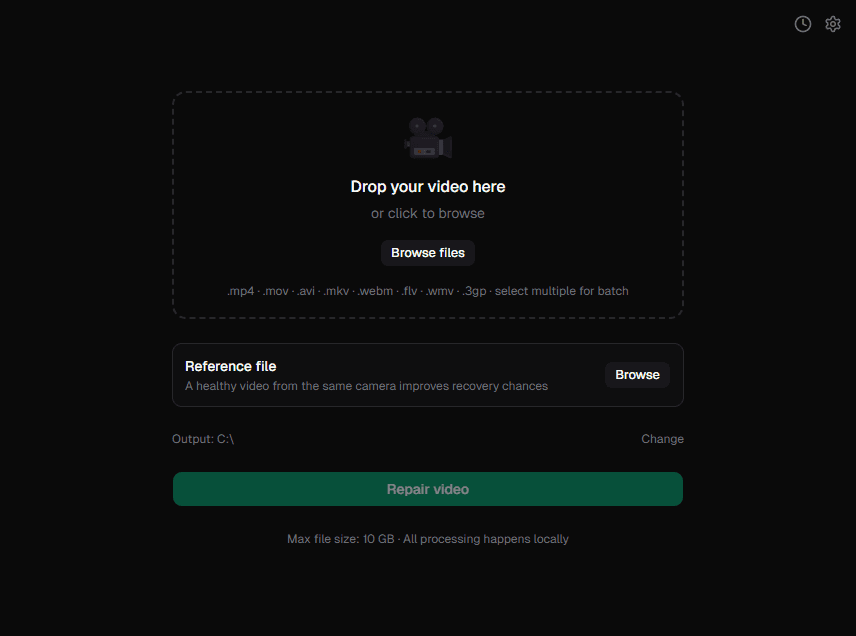
The features that matter most
Viability check
Analyses the file before attempting anything and tells you upfront if recovery is possible.
Shannon entropy
Reference file support
Provide a healthy clip from the same camera to unlock the most powerful recovery path.
Batch queue
Drop multiple files at once. Each is repaired sequentially; one failure never stops the rest.
Up to 9 strategies, tried automatically
VidRepair works through a fixed sequence, stopping the moment one produces a valid, playable output. No configuration needed.
holiday_footage.mp4 · 2.3 GB
Failed: container index missing
Failed: moov atom not found
Rebuilding timestamps…
remux
Rebuilds the container index without touching the encoded stream
faststart
Relocates the moov atom to the front to unblock playback
genpts
Reconstructs missing or corrupted presentation timestamps
mkv_remux
Re-wraps the stream into a Matroska container as a fallback
raw H.264
Scans raw bytes for H.264 NAL units and recontainerizes them
raw HEVC
Scans raw bytes for HEVC NAL units and recontainerizes them
mpegts
Wraps the stream in an MPEG Transport Stream container
m2ts
Wraps the stream in a Blu-ray M2TS container
rescue encode
Last resort: re-encodes whatever portion of the stream is readable
100% local
All processing happens on your hardware. No account, no internet required.
No admin required
Installs to user AppData via NSIS installer. No elevated permissions needed.
Repair history
Last 50 repairs stored locally with strategy, codec, resolution, and outcome.
Partial recovery detection
If the output is shorter than expected, VidRepair flags it so you know exactly what was saved.
Original file untouched
VidRepair only reads the source. All output goes to a directory you choose.
Output validation
Every repaired file is verified with ffprobe before being marked as a success.
8 container formats. All repaired locally.
Recovery success depends on the corruption type and how much of the original container structure remains intact.
Common questions
Can't find what you're looking for? Open an issue on GitHub or email [email protected].
Yes. Every feature, every strategy, no tiers, no trial, no account. It stays free. After a successful repair the app offers an optional pay-what-you-want contribution, and professionals who use it for work can buy a commercial license on the honor system. Nothing is gated and nothing is enforced.
Common causes include interrupted recording (camera battery died, card removed mid-write), storage device failure, incomplete file transfers, and filesystem errors. The container index or moov atom is often missing or damaged.
No. VidRepair only reads the original and writes the repaired output to a separate location. Your source file is never overwritten.
VidRepair will warn you when the recovered output is significantly shorter than what the file size suggests. This typically means part of the data was overwritten and is unrecoverable.
No. VidRepair runs entirely offline. ffmpeg is bundled with the application; no external downloads or cloud processing.
A reference file is a healthy, playable video from the same camera and settings as the corrupted file. VidRepair can use it to reconstruct missing container metadata, improving recovery chances for some corruption types.
The source code is available on GitHub. The app is built with Tauri (Rust) and React.
Recover your video.
No cloud. No account.
Drop in a corrupted file and VidRepair attempts every available strategy automatically, all on your machine.
Free, all features. Supported by the people it helped.
v0.2.0 · Windows 10 / 11 · Free